
Download Fugue AI – AI Art Studio, Free Online Image Generator
Overview
Fugue AI is a cutting‑edge, web‑based AI Art Studio that turns simple text prompts into high‑quality digital artwork in a matter of seconds. Powered by the state‑of‑the‑art DALL·E 2 engine, the platform eliminates the lengthy trial‑and‑error process that traditionally slows down creators. Whether you are a children’s‑book illustrator sketching whimsical characters, a marketing professional designing eye‑catching campaign visuals, a game developer looking for concept art, or simply a hobbyist experimenting with surrealist ideas, Fugue AI delivers reliable, polished results with minimal effort.
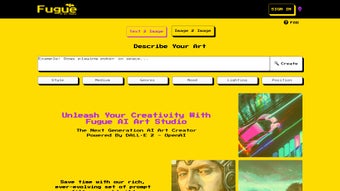
The user interface is intentionally minimalist: a single input box for your description, a concise set of sliders for lighting, color, style, and a real‑time preview window that updates instantly as you adjust parameters. Frequent, automatic updates keep the tool aligned with the latest AI research, ensuring you always have access to the newest styles and resolution options. Because Fugue AI runs entirely in modern browsers, there is no need for bulky installations, license keys, or system‑specific binaries.
The service works on Windows, macOS, Linux, Android, and iOS devices as long as the browser supports JavaScript and a stable internet connection is available. In short, Fugue AI combines speed, flexibility, and ease of use to become a go‑to solution for anyone who wants to generate stunning visuals without mastering complex design software or investing in expensive desktop applications.
Key Features & Benefits
- AI‑Powered Generation: Leverages DALL·E 2 for photorealistic, surreal, and stylized outputs.
- Text‑to‑Image Engine: Convert any descriptive sentence into a ready‑to‑use image.
- Style Library: Choose from photorealism, cartoon, watercolor, oil painting, and more.
- Customization Controls: Fine‑tune lighting, color palette, aspect ratio, and detail level.
- Logo & Advertising Templates: Pre‑built frames for corporate branding and marketing material.
- Instant Preview: Real‑time rendering eliminates the need for multiple revisions.
- Browser‑Based Access: No software download required; works on Windows, macOS, Linux, Android, and iOS browsers.
- Regular Updates: New styles, higher resolution output, and performance improvements released monthly.
- Secure Cloud Processing: All image generation happens on encrypted servers, protecting user data.
- Free Tier with Upgrade Options: Generate a limited number of images per day for free; paid plans unlock higher limits and priority rendering.
These features translate into concrete, day‑to‑day benefits for creators across a wide range of industries. The AI‑powered generation dramatically cuts down the time spent on concept sketches, allowing designers to move from idea to final mock‑up in minutes rather than hours. The extensive style library means you can instantly apply a professional finish—whether you need a sleek corporate logo, a vibrant comic‑book panel, or a delicate watercolor illustration—without hiring a specialist.
Customization sliders give you granular artistic control, ensuring the final piece aligns perfectly with brand guidelines or personal vision. Because all processing occurs in the cloud, you can start a project on a desktop computer, continue on a tablet during a commute, and finish on a phone in a coffee shop, with every change saved automatically. The free tier provides a low‑risk entry point for students and freelancers, while the tiered paid plans scale smoothly for agencies or studios that require bulk image generation and priority server access.
Overall, Fugue AI’s feature set is crafted to streamline creative workflows, reduce costs, and open up high‑quality visual production to anyone with an internet connection.
Installation, Usage & Compatibility
Installing Fugue AI is as simple as opening a web browser. Navigate to https://fugue.ai, and the application loads automatically—no executable files, no installers, and no admin rights required. The only prerequisite is a modern browser (Chrome, Edge, Firefox, Safari) with JavaScript enabled. For the best experience, ensure your browser is up‑to‑date and that you have a stable internet connection, as the AI engine processes requests on remote servers.
Step‑by‑Step Usage Guide
- Enter your prompt: Type a clear, descriptive sentence in the main input field (e.g., “A futuristic cityscape at sunset with neon lights”).
- Select a style: Choose from the dropdown menu or click a thumbnail to apply a preset artistic style.
- Adjust settings: Use sliders for lighting, contrast, color temperature, and aspect ratio to fine‑tune the output.
- Generate: Click the “Create” button. The AI processes the request, typically delivering a result within 10‑15 seconds.
- Refine: If the image isn’t perfect, modify the prompt or tweak the sliders and regenerate.
- Download or share: Once satisfied, click “Download” to save a high‑resolution PNG or use the share link to embed the image elsewhere.
Fugue AI’s compatibility spans all major operating systems because it is browser‑based. The supported platforms include Windows 10/11, macOS 10.15+, Linux distributions with a modern browser, Android 8+ (Chrome), and iOS 13+ (Safari). Users on mobile devices benefit from a responsive layout that adapts controls for touch interaction, making it easy to generate artwork on the go. The only limitation is that browsers with disabled JavaScript or restrictive content‑security policies may prevent the AI engine from loading, so be sure to enable JavaScript and allow pop‑ups from fugue.ai. Additionally, while the service works on virtually any device, older browsers (e.g., Internet Explorer) lack the WebGL and async processing capabilities required for real‑time previews, so a modern browser is strongly recommended for optimal performance.
Pros, Cons, FAQ & Conclusion
Pros & Cons
- Pros
- Fast, high‑quality image generation in seconds.
- No installation required—runs directly in the browser.
- Extensive style library and deep customization options.
- Free tier available for casual users and experimentation.
- Secure cloud processing protects intellectual property and user data.
- Cross‑platform accessibility on desktop and mobile devices.
- Regular feature updates keep the tool on the cutting edge of AI art.
- Cons
- Requires a stable internet connection; offline use is not possible.
- Free tier imposes daily generation caps that may limit heavy users.
- Advanced features, higher resolutions, and priority rendering are locked behind paid plans.
- Performance can degrade on older browsers or devices with limited processing power.
- Long‑term archival of generated images depends on user‑initiated saving; the platform does not store assets indefinitely.
Frequently Asked Questions
Below are some of the most common questions we receive from new and experienced users alike. Each answer is crafted to help you get the most out of Fugue AI, whether you are just starting out or integrating the tool into a larger workflow.
Is Fugue AI really free to use?
Yes, Fugue AI offers a free tier that allows a limited number of image generations per day. For higher limits, faster rendering, and access to premium styles, you can upgrade to one of the paid subscription plans.
Can I use the generated images for commercial projects?
Commercial use is permitted under Fugue AI’s standard license for both free and paid users. Always review the license agreement to ensure compliance with any specific usage restrictions, especially for large‑scale advertising campaigns.
What image resolutions does Fugue AI support?
The platform offers outputs ranging from 512 × 512 px for quick previews up to 2048 × 2048 px for high‑resolution needs. Paid plans unlock the highest resolution options and allow batch downloads.
Do I need to create an account to generate images?
You can generate a limited number of images anonymously, but creating a free account enables you to track usage, save favorite prompts, and access higher generation limits.
Is my data safe when using Fugue AI?
Yes. All data is transmitted over HTTPS, and images are processed on encrypted servers. Fugue AI does not retain prompts or generated images longer than necessary for the session unless you explicitly choose to save them to your account.
Conclusion & Call to Action
Fugue AI stands out as a powerful, user‑friendly AI art studio that democratizes high‑quality image creation. Its seamless browser integration, extensive style options, rapid generation speed, and secure cloud processing make it an excellent choice for designers, marketers, educators, developers, and hobbyists alike. While the need for an internet connection and the caps on the free tier are minor drawbacks, the overall value—especially for those who need quick visual assets without investing in expensive desktop software—far outweighs these limitations. If you’re looking to accelerate your creative workflow, explore new visual concepts, or simply have fun generating artwork from text, Fugue AI provides a reliable, scalable solution. Click the button below to start generating stunning artwork instantly, and experience the future of AI‑driven design today.



.png)



